Stool Design
Bar and counter stools: a round or square seat at the height your counter needs, on legs you can splay and taper, with a footrest ring between them.
3 stools to start from
A bar stool, a splayed stool and a Windsor stool. Each is a starting point.
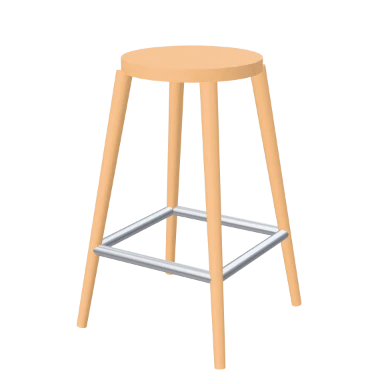
Bar Stool
Stool in oak, 680 mm high.
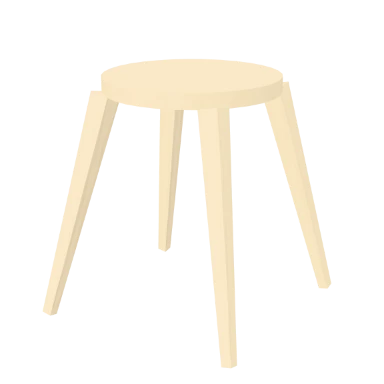
Splayed Stool
Stool in birch ply, 460 mm high.
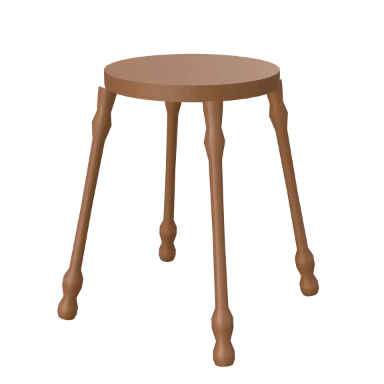
Windsor Stool
Stool in walnut, 500 mm high.
Every property, and what it does
Select a stool and these are its rows: its design and cut sheet, then its seat and legs.
Design and cut sheet
What the piece is, which design it carries, and what it takes to make.
| Field | What it does | Values |
|---|---|---|
| Type | Rebuilds the piece as a different kind of furniture, where it stands. | Table, coffee table, desk, chair, stool, bench, shelving, cabinet, wardrobe, bed |
| Preset | Replaces the piece's design with another, keeping where it stands. | The 3 presets and your saved designs |
| Apply this design to | Gives every other piece of the same kind on this floor, or in the project, the same design. | This floor, the whole project |
| Save this design | Saves the design under a name as a preset of your own. | A name |
| Cut sheet | Counts the boards, sheets, yield, board area, edge tape, timber, bought in hardware and machining it takes, nested on the stock sheet you choose. | Read from the design |
Seat
The seat: its shape, size, height and edge.
| Field | What it does | Values |
|---|---|---|
| Material | The main finish of the piece. | Oak, Walnut, Birch ply, Pine, White laminate, Travertine, Plaster, Concrete, Black metal, Steel, Linen, Boucle, Fabric taupe, Fabric grey, Fabric charcoal, Tan leather, Matte ink, Matte clay, Matte sage, Fluted oak, Brushed brass, Mirror, Quartz white, Led 2700k, Led 3000k, Led 4000k; default Oak |
| Seat shape | A round or square seat. | Round, Square; default Round |
| Seat size | Width of the seat. | 0.26 to 0.44 m; default 0.34 m |
| Seat thickness | Thickness of the seat. | 18 to 55 mm; default 30 mm |
| Height | Height of the seat above the floor. | 0.4 to 0.8 m; default 0.65 m |
| Edge profile | Square seats only | Square, Chamfer, Roundover; default Roundover; advanced |
| Edge size | How big the edge profile is. | 0 to 20 mm; default 8 mm; advanced |
Legs
The legs, their splay and a footrest ring.
| Field | What it does | Values |
|---|---|---|
| Leg profile | The shape of the legs. | Post, Tapered, Round, Turned, Hairpin; default Round |
| Leg taper | Narrowing toward the foot (tapered / round / turned legs) | 0 to 0.7; default 0.35; advanced |
| Leg splay | How far the legs lean out. | 0 to 25°; default 9° |
| Leg diameter | How thick each leg is. | 22 to 60 mm; default 40 mm |
| Footrest ring | A ring between the legs to rest feet on. | On or off; default on |
How stools are designed
Open Custom furniture
In the editor, open Furnish and choose Custom furniture, or type CUSTOM (CF). The presets open, by kind.
Place it
Pick a stool, then click where it goes, at the island or the counter.
Shape it
Change the seat's shape, size and height, the legs, their splay and the footrest.
Get the cut sheet
The cut sheet counts every board and nests it on stock sheets, with the edge tape, timber and hardware.
Stools questions, answered.
How tall can a stool be?
From 0.4 to 0.8 m to the seat, from a low stool to a bar stool.
Can a stool have a footrest?
Yes. A footrest ring runs between the legs, on or off.
Can I get a cutting list?
Yes. The cut sheet lists the boards, nests them on a stock sheet size you choose, and adds up the edge tape, timber, hardware and machining.
Read on
- Kitchen Design: The island and counter they stand at.
- Chairs: Dining chairs and armchairs.
- Custom Furniture: All ten kinds of piece, and their cut sheets.
- Furniture and kitchens docs: The catalogue, custom furniture, pots and plants.